
Morse Code Keyer and Sounder
Have you ever wanted to send or receive Morse code messages accurately but struggled with timing or clarity? That’s exactly why we developed the Morse Code Keyer and Sounder. The keyer helps you produce precise dots and dashes effortlessly, while the sounder gives clear audible feedback for every signal. Together, these tools create a complete system that not only makes learning Morse code easier for beginners but also gives experienced operators full control over their transmissions. Mastering them is the first step toward confident and efficient Morsecode communication.
What Is a Morse Code Keyer and Sounder?
A Morse Code Keyer and Sounder are devices designed to make sending and receiving Morse code simpler and more accurate. The keyer helps generate properly timed dots and dashes, while the sounder converts these signals into audible clicks that can be interpreted easily. Together, they create a complete system for both learning and practical communication. Understanding their functions is the first step in becoming proficient with Morse code.
What a Keyer Does?
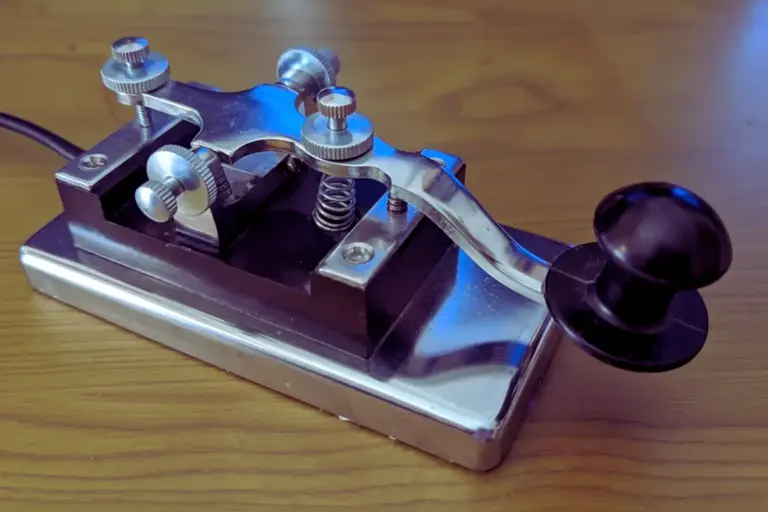
A keyer is a device that automates the timing of your Morse code signals, so you don’t have to worry about pressing each dot and dash manually. It allows for smoother and faster transmission, which is especially useful for beginners learning rhythm and experienced operators sending long messages. With a keyer, your Morse code becomes consistent and easier to read.
What a Sounder Does?
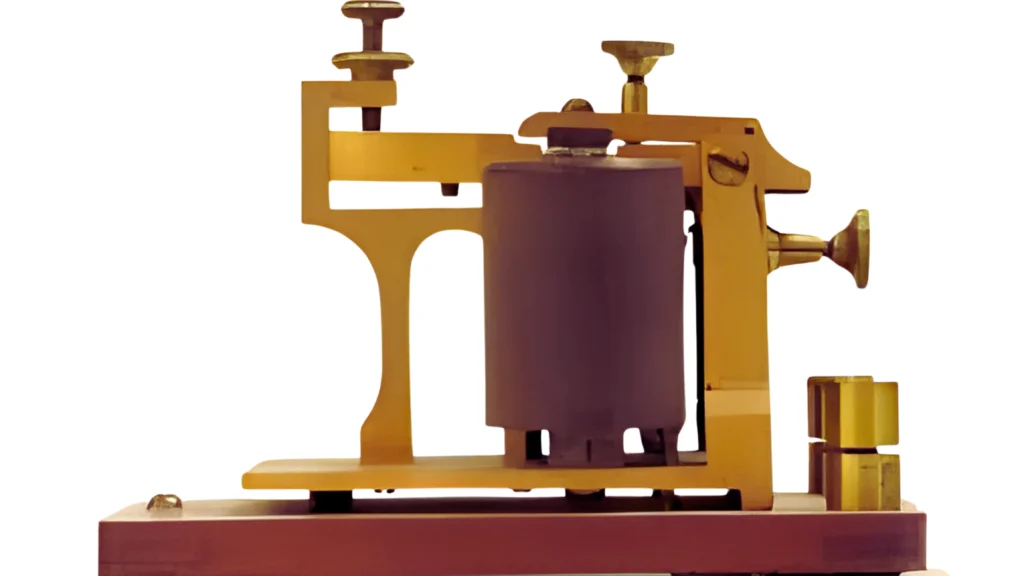
A sounder converts the electrical signals from a keyer or straight key into audible clicks or tones. These clicks represent dots and dashes, allowing you to hear and decode messages in real-time. Sounders are essential for practicing listening skills and understanding Morse code as it was traditionally transmitted.
How a Morse Code Keyer Works?
A Morse code keyer makes sending messages much easier by automatically controlling the timing of each dot and dash. Rather than depending on perfectly timed manual key presses, the keyer ensures consistent signals, helping beginners learn more efficiently and allowing experienced users to send messages quickly and clearly. Understanding its functionality not only builds confidence for newcomers but also enhances precision for advanced operators..
Straight Key Operation
A straight key is the most basic Morse code key, where each press sends a signal directly. The duration of the press decides whether the signal is a dot or a dash, so timing depends entirely on the operator’s skill. Although widely used in early telegraphy, straight keys require regular practice to maintain a steady and balanced rhythm.
Electronic Keyer Timing
Electronic keyers control Morse code timing with precision and allow users to set their preferred speed in words per minute (WPM). They produce evenly spaced dots, dashes, and pauses, ensuring clean and consistent transmissions. This automatic timing is especially useful for long messages and high-speed Morse code practice.
Paddle Keyer (Iambic) Basics
A paddle keyer uses one or two paddles to generate dots and dashes automatically, reducing the need for exact manual timing. In dual-paddle (iambic) mode, pressing both paddles alternates dots and dashes smoothly. This setup helps beginners keep a consistent rhythm and allows advanced users to send messages faster and with less effort.
How a Morse Code Sounder Works?
A Morse code sounder changes electrical signals into audible clicks or tones. When a signal reaches the sounder, a small mechanical movement creates a distinct sound for each dot and dash. This allows operators to hear and interpret messages accurately. Sounders played a vital role in early telegraph systems and are still helpful for learning Morse code today.
Why Sounders Are Still Used Today
Sounders remain popular because they help learners develop strong listening skills and a reliable sense of timing. Hearing clear dots and dashes makes decoding quicker and more accurate, especially during live communication. Even with modern digital tools, practicing with a sounder strengthens core Morse code skills.
Keyer vs Sounder What’s the Difference?
While both keyers and sounders are essential for Morse code, they serve distinct purposes. A keyer focuses on sending signals accurately and consistently, while a sounder allows you to hear and interpret those signals. Together, they provide a complete system for both transmitting and receiving Morse code efficiently. Understanding their differences helps learners choose the right tool for their current needs.
Function and Usage Comparison
A keyer automates the timing of dots and dashes, making sending messages faster and more consistent. In contrast, a sounder doesn’t send signals it only converts them into audible clicks for decoding. While keyers are primarily for transmitting, sounders are indispensable for listening practice and developing accurate reception skills.
Which One Is Better for Beginners?
For beginners, starting with a keyer helps them focus on producing consistent signals without worrying about manual timing. However, pairing it with a sounder is highly recommended, as it trains the ear to recognize Morse code patterns. Using both tools together accelerates learning and builds confidence in both sending and receiving messages.
Types of Morse Code Keyers and Sounders
Morse code devices come in several types, each designed to suit different skill levels and purposes. From simple manual keys to advanced electronic keyers, understanding the options helps you choose the right tool for learning or professional use. Exploring these types gives insight into both historical and modern Morse code practices.
Straight Key
The straight key is the classic Morse code key, where each press creates a dot or dash manually. It requires precise timing from the operator, making it excellent for practicing rhythm and control. Although simple, mastering the straight key builds a solid foundation for all other types of keyers.
Single-Paddle Keyer
A single-paddle keyer automates the production of dots or dashes depending on which side of the paddle you press. This allows for smoother sending and easier learning of Morse code rhythms. Single-paddle keyers are ideal for beginners who want a balance between manual practice and automation.
Dual-Paddle (Iambic) Keyer
Dual-paddle keyers, also known as iambic keyers, let you press both paddles simultaneously to alternate between dots and dashes automatically. This design increases speed and efficiency, making it popular among experienced operators. Learning to use an iambic keyer improves sending accuracy and overall proficiency
Common Beginner Mistakes and How to Avoid Them
Beginners often struggle with maintaining consistent timing and proper technique when learning Morse code. From my own experience developing and testing Morse code tools, I noticed that small mistakes in rhythm or keying can quickly become frustrating. Recognizing these common pitfalls early helps learners adopt better habits, improving both sending and receiving skills, and makes the learning process faster and more enjoyable.
Uneven Timing & Finger Pressure
One of the most frequent errors in Morse code is pressing the key too quickly, too slowly, or applying uneven pressure. From my experience working with advanced keyers, I found that inconsistent keying can cause dots and dashes to merge, making messages hard to read. Focusing on steady timing and gentle, even finger pressure ensures clear, readable Morse code and helps learners build confidence in their sending skills.
Bad Rhythm and Ignoring Sounder Practice
Maintaining proper rhythm is essential for smooth and understandable Morse code transmissions. From my experience using both keyers and sounders, I noticed that many beginners focus solely on sending and often neglect listening, which can slow down their decoding skills. Regular practice with a sounder trains the ear, reinforces accurate timing, and significantly improves overall Morse code proficiency.
FAQs
Learning Morse code raises many common questions, especially for beginners. This FAQ section addresses key concerns about tools, techniques, and best practices. Understanding the answers helps learners make informed choices and progress faster in their Morse code journey.